Using iPads Creatively in the Art Room to Encourage Critical Thinking
Since teaching I have been following various educators in the online sphere and participating with a few collaborations. I have always been searching to learn more about how other educators integrate technology into the art room. For the most part I have been disappointed. For example the website by two fellow art educators has received some acclaim, however it is lacking in lessons that require original artwork, creativity and critical thinking skills. See here. Why must every student draw a polar bear or Percolate a santa (all in same pose) or use pre-made images for collage or draw an alien walking or create from a template?? Is there no other way to use the iPads??
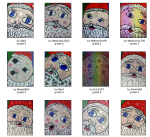
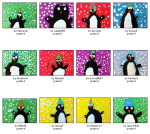

In my previous post about my philosophy of art education, I stated that critical thinking and creativity are an important part of what I focus my lessons on. If art is supposed to be creative, why then do art teachers choose to do lessons that limit creativity for their students?
Possible Explanations:
1. To teach students a new skill or application
Is there another way to teach or allow students to explore a tool or application with an expected outcome?
2. Because the instructor lacks the knowledge of the technology
I think this is often the root of the problem for most new users of technology or applications.
3. The lessons are not student centered or inquiry-based
The type of lessons that the teacher usually teaches is what they will do when integrating technology. i.e. inquiry based/project based learning vs cookie cutter. The ipad is a tool that can be used creativity, but just using it doesn’t make the creative or encourage creative critical thinking. I am still working on analyzing and changing my lessons to all be student centered & inquiry-based with the help of the iPad.
So, how can ipads be used creatively in the art room? (Even if you only have 4)
**Before hand: Try using the as many as and in as many ways as possible. This is what every kids I have seen does when just handed an ipad does. Personally I skip the games, I’d rather use every moment possible to allow my students to create something original.**
Inquiry based approach
Ipads were made for differentiation. They are multi-functional devices that allow students and teachers to do so so much. I will share specific examples below of how I differentiate with my students. My 5th grade students have been studying global conflicts in Social Studies. Last year all the students used the ipads to create propaganda posters using the app Phoster and then glued on block print images. This really did not allow for as much creativity or critical thinking as I would have liked.
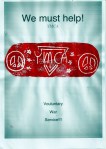


So this year it was time to improve. My students had a worksheet that asked questions about the creative process and about 3 types of conflict: personal, community or global. I do not like to give examples of projects especiallly since the culture of South Korea encourages copying, but I did show and discuss this short animation:
Making it happen
Step 1: Clearly define the project’s expected outcome.
Students completed the worksheet that required thinking about types of conflicts. As individuals or in small groups students planned a piece of artwork that showed conflict or conflict and resolution of a personal, community or global conflict. I chose the topic because they have background knowledge in global conflict and experience with personal conflict. The students were shown a simple rubric that they will use to evaluate themselves based on: understanding of the creative process, craftsmanship and originality. These three criteria were discussed and examples were given to evaluate using the rubric.
Step 2: Plan
I gave a list of materials that they were allowed to choose from. If other materials were required they could ask me if they could use it or bring in materials from home. (Both happened) I mentioned the possibility of using the iPads but gave the warning that we only have 4. Students who wanted to create animations had to make a storyboard instead of a sketch of their project.
Step 3: Research
What needs to happen in order to create what you planned? I make it… Well what do you need to do first? and continues the questioning process to get students to think about what they need to know in order to make what they want. How am I supposed to help 3 kids that want to use clay, 2 that want to make a book, 6 that are animating, and another 4 painting?
Enter the iPads.
Now ipads are not actually needed to make this type of inquiry-based learning or differentiation happen, they just help a lot. Since I had my students plan out their art pieces I had an idea of what they would need to use or need to know in order to be successful. Edmodo, Dropbox, Keynote and QR reader/creator-Qrafter were my go to tools. I have a small collection of skill/process based tutorials that I have created, but I also relied on Expert Village on YouTube for additional help. Storyboarding and prop creation can take a bit more time than sketching so while one group was using their sketchbooks another was using the ipads for research.


Step 4: Create
This is where we are at now. Students are in various stages of their project and have been begging to come to the art room during lunch….which I consider a sign of a good project. The projects have been about a variety of topics from war to environmental conflict, homelessness to bullying. Students are using a variety of materials and applications. Below are a few of the regularly used apps:

(3 different animations programs?? Oh my! Well I have scaffolded the animation projects so that my some of my students have become experts. All my 4th graders from last year have used iStop Motion and iMovie. In addition a quarter of each students in each 3rd, 4th and 5th have had experience rotoscoping using Sketchbook or Toontastic due to mini courses.)
Here are a few so far:
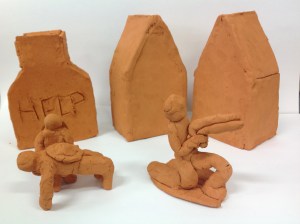
These projects by five students are not completed yet.
The “help” house address homelessness. The three soldiers are about war. The two house will be about a neighborhood conflict.
 This piece is about the conflict of desire and pressure to be something else.
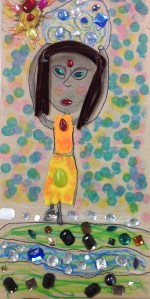
This piece is about the precious resource of water. It’s importance is shown by the use of jewels.
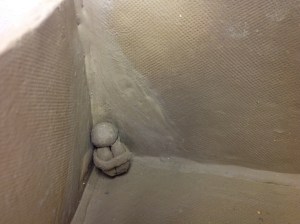
I can not wait to see this piece finished. The style of his sketch was very expressive in monochromatic. This piece is about bullying and how lonely that student felt when they were bullied.
Clip from an animation drawn on DoInk, the general and his soldiers.
Step 5: Share and Reflect
Students will be publishing their artwork on Artsonia and writing artist statements about their piece. It looks like the artwork will not be done til next year, so the self evaluation rubric will happen then.
**I am thinking about letting students who did drawings and paintings, photograph their work and try a filter application: such as Auto Painter HD, Percolator, Collagraphy, Photo Tropedelic, etc. I will use this as a reflection of how their artwork could be changed rather than the final piece.
Conclusion:
This is a simplified version of the creative process which was this art unit’s theme. The students have been doing a great job working in groups or individually to create a variety of work. Using a clearly defined problem has allowed the students to be creative in so many interesting ways. I am making a few changes to the next two units and am glad to find this project successful.
 Traveling Art Teacher
Leave a comment